
15th Club Golf GPS Rangefinder
Advantage Golf GPS TechnologySports
3.6178.00 Reviews
- Version
- 4.4.2
- Installs
- 50.00K
- Age Rating
- Everyone
Screenshots
Our Review of 15th Club Golf GPS Rangefinder
 Analysis by Appyee
I like golf apps that stay out of the way when I am standing over a shot. 15th Club Golf GPS Rangefinder is built around that simple idea: it combines course distances, a scorecard, shot tracking, and course maps in one sports app instead of making me switch between several tools. Developed by Advantage Golf GPS Technology, it is free to start, rated for Everyone, and aimed at golfers who want practical information during a round rather than a complicated training platform.
After spending time with it, my impression is that its appeal depends less on flashy extras and more on how well its different tools fit into a normal round. The rangefinder is the main attraction, but the scorekeeping and shot-tracking functions make it more useful over eighteen holes. I would recommend it most readily to casual and improving golfers who want a digital playing companion without immediately buying dedicated hardware. I would be more cautious with competitive players who need the most polished possible experience or who dislike depending on a phone throughout a round.
What the app feels like on the course
I find a phone-based golf tool earns trust through a steady, low-fuss routine, not through promises. This section looks at how I would fit 15th Club Golf into a round while keeping attention on the course, then turns to the choices a player can make before relying on it for distances or records.
A quick start, with expectations set correctly
The first thing I noticed is that the concept is easy to understand. I can open the app, look for a course, and use the map and distance information as the round develops. That straightforward purpose matters because a golf GPS tool is most useful when it answers a question quickly: how far is the target, where is the trouble, and what should I record after the shot?
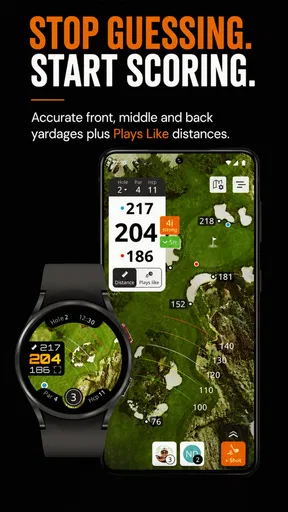
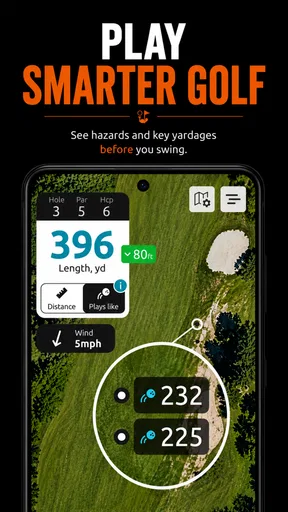
The app is not trying to replace every golf accessory. It is better understood as a phone-based rangefinder and round log. The course map gives me a visual reference, while the distance display helps turn that view into a decision. The scorecard then keeps the administrative side of golf in the same place. I found that combination more practical than using one app for distances and another for scoring, especially when I wanted to review the round afterward.
Its current version is 4.4.2, and the app has been available since April 8, 2022. That gives it enough time in the market to feel like an established product rather than a brand-new experiment. It has passed fifty thousand installs, with an average rating of 3.6 from more than eight hundred ratings and over one hundred reviews. Those figures suggest a useful but not universally loved experience, which matches my view: the idea is strong, while the quality of a particular round can depend on how smoothly the app behaves on a given phone and course.
What I would use before the first tee
I would prepare the app before arriving at the course rather than waiting until I am already in the starting area. Searching for the course, checking the map, and making sure the scorecard is ready are small steps, but they reduce the amount of screen work needed when other golfers are waiting. This is one of the most important habits with any phone-based golf tool: preparation protects the pace of play.
I also recommend deciding in advance how much information you actually want. Some golfers will use the map constantly, while others only need a distance and a place to record the score. If I try to track every shot, inspect every map detail, and manage scoring at the same time, the app becomes more demanding than it needs to be. A simple workflow is usually better: check the target, play the shot, record the result, and move on.
Speed expectations during a normal round
Perceived speed is especially important here because golf decisions happen between shots. I found the app most comfortable when I treated it as a quick reference rather than a screen to browse continuously. Opening the relevant hole, checking the map, and returning my attention to the course feels natural. The less I ask the phone to do at once, the more responsive the overall experience feels.
There is also a psychological advantage to having the scorecard and shot tracking beside the distance tools. I do not need to remember everything until the end of the hole, when details are already blurred together. Recording information close to the moment keeps the round more accurate, but I would still avoid entering notes or exploring menus while another player is preparing to hit.
Users should not expect a dedicated rangefinder device to feel exactly like a phone app. A separate golf device generally has a purpose-built interface and can be easier to glance at. A phone offers a larger map and more flexible record keeping, but it also brings normal phone friction: unlocking the device, managing the display, and keeping the app in the foreground. For me, the trade-off is worthwhile during relaxed rounds, but less attractive when every second matters.
Heavy-use moments: maps, scoring, and shot tracking together
The busiest part of using 15th Club Golf is not one isolated feature. It is the sequence of checking a hole map, choosing a target, tracking a shot, and updating the score. That is where the app has the most value, but also where I would expect the greatest strain on both my attention and the phone. A golfer who uses only the distance view will have a simpler experience than someone who records every shot and continually consults the map.
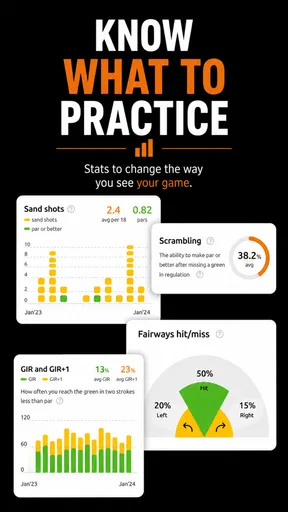
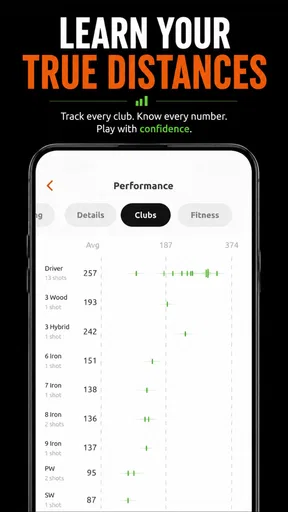
Shot tracking is most useful when I use it with a clear purpose. Rather than trying to create a perfect statistical record, I would track the shots that answer a question: how far did my typical drive go, where did I lose strokes, or which club choice caused trouble? This turns the feature into a learning tool. It also avoids the frustration of spending more time logging the round than playing it.
The scorecard has a different role. It is the dependable backbone of the session, and I would use it even on days when I ignore shot tracking. Keeping the score digitally makes it easier to avoid forgotten holes or uncertain totals. The best workflow is to enter the score immediately after finishing each hole, before moving to the next tee. That small discipline is more valuable than trying to reconstruct the entire round later.
On a busy day, I would keep the display interactions short and avoid switching to unrelated phone apps. Returning to the golf screen repeatedly can make any mobile tool feel slower, even when the app itself is functioning normally. A little preparation and a consistent routine make a noticeable difference to the perceived pace.
Reliability is more than the map
For a GPS golf app, reliability has several layers. The course must be available, the location view must be useful, the score must save correctly, and the app must recover gracefully if I momentarily lose focus or the phone becomes busy. I judge 15th Club Golf by the whole chain rather than by the distance display alone.
The safest way to use it is as an aid, not as my only source of truth. I still want to look at the actual fairway, hazards, wind, lie, and pin position. A map can support a decision, but it cannot see the conditions from my exact position. This is particularly important for approach shots, where a small change in lie or wind can matter more than a neat number on the screen.
I would also make a habit of checking the selected course before beginning the round. That sounds obvious, but it is an easy mistake with any course-based app, especially at facilities with similar names or multiple nearby layouts. A quick confirmation prevents the rest of the round from being built on the wrong map.
Recovery matters when the phone is interrupted by a call, a message, a low-power warning, or another app. I would not assume that every unsaved action will be preserved after an interruption. Recording the score hole by hole is therefore safer than postponing it. If I am tracking shots, I would use the same approach: complete a small entry immediately rather than trusting my memory for several holes.
Device constraints and battery-minded habits
The app runs on a phone, so the phone becomes part of the golfing experience. A larger screen makes course maps easier to read, but it can also be awkward to hold while carrying clubs or walking between shots. A smaller phone is easier to manage but may require more zooming and concentration. I would choose convenience over maximum map detail and avoid pulling the device out for every minor question.
GPS use can be demanding during a long round, particularly if the display stays active and the golfer checks the map frequently. I would begin with a well-charged phone and reduce unnecessary screen time. A portable battery is sensible for golfers who already know their device struggles during outdoor use. These are not unique flaws in this app; they are practical limits of using a smartphone as a rangefinder.
Sunlight is another real constraint. Outdoor visibility varies widely between phones, and a map that looks clear indoors may require more attention in bright conditions. I would increase readability before the first tee and keep the phone positioned so I am not standing still trying to interpret the screen. The app can provide useful information, but the course should remain the primary visual reference.
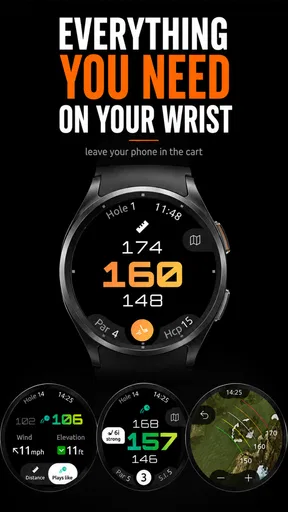
Weather also changes the experience. Wet hands, gloves, glare, and a phone tucked into a pocket all make interaction less convenient. This is where a dedicated golf watch or rangefinder can be a better alternative for some players. Those devices are easier to consult with minimal handling, while the phone-based approach gives me richer map and record-keeping possibilities.
Where it fits among the usual alternatives
The closest alternative is a dedicated GPS rangefinder or golf watch. Hardware wins when I want immediate access, predictable controls, and less dependence on the phone screen. It can be the better choice for frequent golfers who play in difficult weather, compete regularly, or simply want a device that feels separate from everyday notifications.
Another alternative is a basic scorecard app. That option may be preferable for golfers who only want to record strokes and do not care about maps or shot history. 15th Club Golf earns its place by combining those functions with distance information. If I only need a digital scorecard, its wider feature set may feel unnecessary. If I want one place for course orientation and round records, the combination is more convincing.
There is also the traditional paper scorecard and a handheld rangefinder. That setup remains appealing because it is simple, quick, and largely independent of battery life. The disadvantage is that information becomes split between tools, and there is no convenient digital record of the round. The app sits between those extremes: more capable than paper, less specialized than dedicated hardware.
The free starting price makes experimentation easy, although in-app purchases range from $4.99 to $79.99 per item. I would explore the basic workflow first and only spend money after deciding that the map, scoring, and tracking routine genuinely improves my rounds. The right question is not whether every available purchase is necessary, but whether the app saves enough effort or adds enough useful detail for my style of play.
Who will get the most from it
I think this app suits a golfer who plays socially, wants help with distances, and is interested in learning from past rounds without buying another piece of equipment. It is also a reasonable option for someone returning to golf who wants a gentle introduction to course management. The map can help with orientation, while shot tracking encourages more honest reflection than relying on memory.
It is especially useful in a realistic weekend scenario. I arrive at a course I do not know, select the layout before teeing off, and use the map to understand the first few holes. After each hole, I enter the score. On a few important shots, I record the result rather than tracking everything. By the turn, I have a usable record and a better sense of where my decisions are costing strokes, without turning the round into a data-entry session.
I would skip it if I dislike taking my phone onto the course, play in conditions where touchscreens are inconvenient, or already own a dedicated device that provides the information I need faster. I would also hesitate if my main goal is advanced coaching analysis rather than practical round assistance. The app can organize useful observations, but it should not be mistaken for a complete swing-analysis system.
My performance verdict after weighing the trade-offs
15th Club Golf GPS Rangefinder is a sensible free sports app with a clear everyday purpose. Its strongest quality is the way distance guidance, course maps, scoring, and shot tracking support one another. I can use just one part or build a fuller routine around the whole package. That flexibility is more valuable to me than a long list of isolated tools.
Its limitations come from the same decision that makes it accessible: it relies on a smartphone. Screen visibility, battery use, interruptions, and the need to handle the device can all affect the round. The app is also not automatically the best choice for golfers who demand the fastest possible hardware experience or who want a highly specialized training system.
My advice is to start simply. Prepare the course before play, use the map for decisions rather than constant browsing, record scores immediately, and track only the shots that can teach you something. That workflow keeps the app responsive in practice and prevents useful features from becoming distractions. For casual golfers and improving players, the best value is not collecting more information, but making each piece of information easier to use.
Overall, I see it as a practical companion rather than a replacement for course awareness or specialist equipment. The 3.6 average rating reflects a mixed reception, but I would not dismiss it on that basis alone. If you want a phone-based golf GPS tool that also keeps your score and selected shot details together, it is worth trying. If you want maximum reliability with minimal phone handling, a dedicated alternative will probably suit you better.
Verdict
Strengths of 15th Club Golf GPS Rangefinder
- Accurate GPS distances to greens, hazards, and fairway targets
- Digital scorecard makes tracking rounds quick and convenient
- Works across a large database of golf courses worldwide
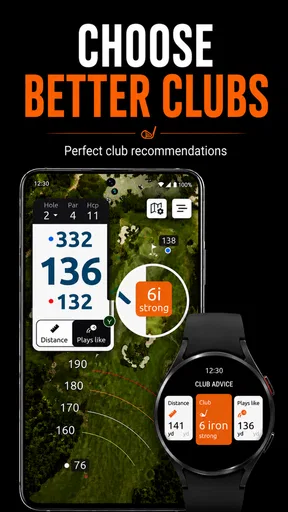
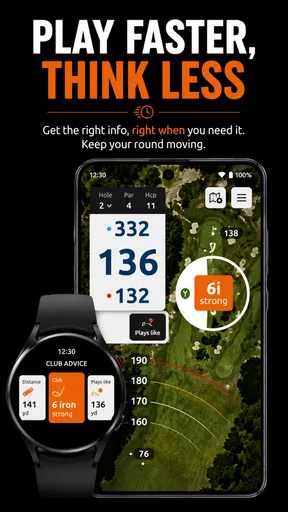
- Club recommendations can help improve shot planning
- Clean interface is easy to understand during a round
Limitations of 15th Club Golf GPS Rangefinder
- Some advanced features may require a paid subscription
- GPS accuracy can vary with weak signal or poor weather
- Continuous location use may reduce phone battery life
- Course data may occasionally need updates or corrections
- Limited value for golfers who prefer paper scorecards
Similar Picks in This Category
View All
BeSoccer: Soccer Live Score
BeSoccer apps4.3

Cricbuzz - Live Cricket Scores
Cricbuzz.com3.7

NFL
NFL Enterprises LLC2.4

Da Fit
MO YOUNG LIMITED3.6

ESPN
Disney4.5

LiveScore: Live Sports Scores
LiveScore Limited4.5
Frequently Asked Questions
What is 15th Club Golf GPS Rangefinder, and how does it work?
15th Club Golf GPS Rangefinder is a mobile golf app designed to help players understand distances and plan shots on the course. After opening the app and allowing location access, it uses GPS data to identify your position and provide yardage information for relevant course features, such as the front, middle, and back of the green. It is intended as a practical alternative to carrying a separate handheld rangefinder.
Does 15th Club Golf GPS Rangefinder include the golf courses I play?
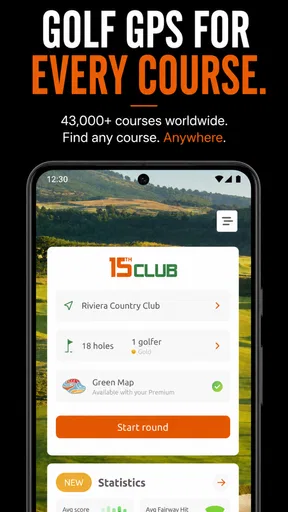
The app is designed to support a broad selection of golf courses, but coverage can vary by country, region, and individual club. Before relying on it for an important round, search for your home course or the course you plan to visit and confirm that the layout appears correctly. Course information may also change over time, so checking for updates is worthwhile when preparing for a tournament or unfamiliar venue.
Does the app require an internet connection or GPS permission?
15th Club Golf GPS Rangefinder generally needs location permission so it can determine your position on the course and calculate useful distances. GPS works best outdoors with a clear view of the sky, while an internet connection may be needed to download course data, load maps, sign in, or receive updates. Mobile reception can affect initial loading, so it is sensible to open the course before starting your round.
Is 15th Club Golf GPS Rangefinder accurate enough for real golf rounds?
The app can provide helpful distance estimates, but its accuracy depends on your phone’s GPS hardware, signal quality, battery settings, course mapping, and the way the course has been surveyed. It should be treated as a guidance tool rather than a guaranteed replacement for a professional laser rangefinder. For casual play it can be very convenient, while competitive golfers should confirm whether GPS devices are permitted under their event’s rules.
How much battery and data does 15th Club Golf GPS Rangefinder use?
Because the app relies on location services and may keep the screen active while you move between shots, it can consume more battery than a standard scorecard application. Usage varies according to screen brightness, GPS signal, phone model, and the length of the round. Charging your phone beforehand, carrying a power bank, and downloading or loading course information in advance can help prevent interruptions during play.
